
Tutorial 4: Values, Quantities and Transformations
In this tutorial you will learn the difference between coordinate quantities and coordinate values,
and two ways to transform them between coordinate systems:
mapCS() for creating reusable transformation objects,
and map_to() as a convenient shorthand for one-shot transformations.
You will also see how to batch-transform multiple points using coord_cloud.
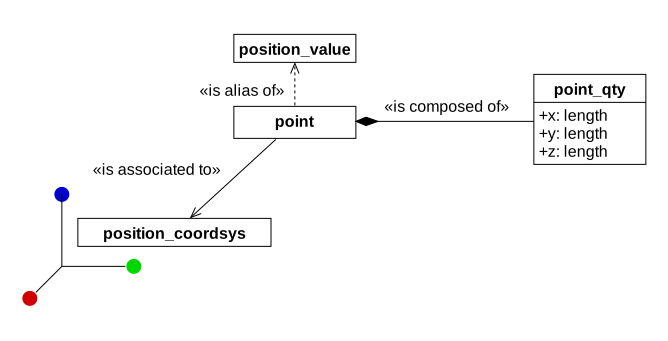
A coordinate quantity (point_qty) holds raw numeric coordinates without any reference frame.
A coordinate value (point) associates a quantity with a coordinate system.
The value references a coordinate system and contains a coordinate quantity.
The Code
#include <print>
import ninbot;

int main()
{
   using namespace nin;
   using namespace nin::R3;

   point_qty qty = {1_m, 2_m, 3_m};

   position_coordsys_child CS1 {WCS, { {1_m, 0_m, 0_m}, {{0, 0, 1}, 90_deg} }};

   point value = {CS1, qty};

   std::println("Quantity:              {}", qty);
   std::println("Value in CS1:          {}", value.qty());
   std::println("Value mapped to WCS:   {}", value.map_to(WCS));

   position_coordsys_child CS2 {WCS, { {0_m, 2_m, 0_m}, {{0, 0, 1}, 45_deg} }};

   auto tf_1_to_2 = mapCS(CS1, CS2);
   auto tf_1_to_W = mapCS(CS1, WCS);
   auto tf_W_to_2 = mapCS(WCS, CS2);

   point P = {CS1, {1_m, 0_m, 0_m}};

   point_qty P_in_CS2 = tf_1_to_2( P.qty() );
   point_qty P_in_WCS = tf_1_to_W( P.qty() );

   point_qty P_via_map_to    = P.map_to(CS2);
   point_qty P_via_map_to_W  = P.map_to(WCS);

   std::println("P in CS2 (mapCS):   {}", P_in_CS2);
   std::println("P in CS2 (map_to):  {}", P_via_map_to);
   std::println("P in WCS (mapCS):   {}", P_in_WCS);
   std::println("P in WCS (map_to):  {}", P_via_map_to_W);


   coord_cloud<position_coordsys_traits> cloud {CS1, std::vector<point_qty>{
      {0_m, 0_m, 0_m},
      {1_m, 0_m, 0_m},
      {0_m, 1_m, 0_m},
      {0_m, 0_m, 1_m},
   }};

   std::vector<point_qty> cloud_in_CS2 = cloud.map_to(CS2);
   std::vector<point_qty> cloud_in_WCS = cloud.map_to(WCS);

   coord_cloud<position_coordsys_traits> cloud_out = tf_1_to_2(cloud);

   std::println("Cloud in WCS:");
   for (point_qty const& p : cloud_in_WCS)
      std::println("  {}", p);

   return 0;
}
Output
Quantity:              (1, 2, 3) (m)
Value in CS1:          (1, 2, 3) (m)
Value mapped to WCS:   (-0.9999999999999998, 1.0000000000000004, 3) (m)
P in CS2 (mapCS):   (2.220446049250313e-16, -1.414213562373095, 0) (m)
P in CS2 (map_to):  (2.220446049250313e-16, -1.414213562373095, 0) (m)
P in WCS (mapCS):   (1.0000000000000002, 1, 0) (m)
P in WCS (map_to):  (1.0000000000000002, 1, 0) (m)
Cloud in WCS:
  (1, 0, 0) (m)
  (1.0000000000000002, 1, 0) (m)
  (0, 2.220446049250313e-16, 0) (m)
  (1, 0, 1) (m)
Building the code
Save the example as coordinate-transformations.c++ alongside this CMakeLists.txt:
cmake_minimum_required(VERSION 4.0)
project(coordinate-transformations LANGUAGES CXX)

find_package(Ninbot REQUIRED)

add_executable(coordinate-transformations coordinate-transformations.c++)
target_link_libraries(coordinate-transformations PRIVATE ninbot::ninbot)
Then configure and build:
cmake -B build -G Ninja -DCMAKE_PREFIX_PATH=/path/to/ninbot/build
cmake --build build
./build/coordinate-transformations
Walkthrough
Quantities vs values
point_qty qty = {1_m, 2_m, 3_m};A point_qty holds the raw measures of a 3D position — three length values — without being tied to any coordinate system.
position_coordsys_child CS1 {WCS, { {1_m, 0_m, 0_m}, {{0, 0, 1}, 90_deg} }};

point value = {CS1, qty};
A point associates a quantity with a coordinate system.
Here value represents the coordinates (1, 2, 3) expressed in CS1.
std::println("Quantity:              {}", qty);
std::println("Value in CS1:          {}", value.qty());
std::println("Value mapped to WCS:   {}", value.map_to(WCS));
The quantity and the value’s .qty() both print (1, 2, 3) (m) — the raw numbers are the same.
But map_to(WCS) transforms those coordinates through the CS1 → WCS chain,
yielding different numbers because CS1 is offset and rotated relative to WCS.
Creating transformations with mapCS()
mapCS() creates a reusable transformation object that converts coordinates from one frame to another.
position_coordsys_child CS2 {WCS, { {0_m, 2_m, 0_m}, {{0, 0, 1}, 45_deg} }};

auto tf_1_to_2 = mapCS(CS1, CS2);
auto tf_1_to_W = mapCS(CS1, WCS);
auto tf_W_to_2 = mapCS(WCS, CS2);
These transformation objects can be applied multiple times to different coordinate quantities.
Creating the transformation once and reusing it is more efficient than calling map_to() repeatedly.
Transforming a single point with mapCS()
point P = {CS1, {1_m, 0_m, 0_m}};To transform P, first extract its quantity with .qty(), then apply the transformation:
point_qty P_in_CS2 = tf_1_to_2( P.qty() );
point_qty P_in_WCS = tf_1_to_W( P.qty() );
The transformation objects are callable — use operator() to apply them.
The map_to() shorthand
For one-shot transformations, map_to() is more convenient:
point_qty P_via_map_to   = P.map_to(CS2);
point_qty P_via_map_to_W = P.map_to(WCS);
map_to() combines creating the transformation and applying it in a single call.
The result is identical to using mapCS(), but requires less boilerplate.
If you are transforming to the same target frame multiple times, prefer mapCS() for efficiency.
If you are transforming to different frames or only once, prefer map_to() for readability.
Batch transformations with coord_cloud
A coord_cloud holds a collection of coordinate quantities all in the same coordinate system:
coord_cloud<position_coordsys_traits> cloud {CS1, std::vector<point_qty>{
   {0_m, 0_m, 0_m},
   {1_m, 0_m, 0_m},
   {0_m, 1_m, 0_m},
   {0_m, 0_m, 1_m},
}};
You can transform the entire cloud at once:
std::vector<point_qty> cloud_in_CS2 = cloud.map_to(CS2);
std::vector<point_qty> cloud_in_WCS = cloud.map_to(WCS);
cloud.map_to() returns a vector of point_qty objects in the target frame.
Alternatively, apply a pre-built transformation object:
coord_cloud<position_coordsys_traits> cloud_out = tf_1_to_2(cloud);This returns a new cloud whose quantities have been transformed and whose coordinate system is set to CS2.